
Lenticular Displays for In-Store Product Showcases

A shelf display can do more than hold a static image. Lenticular displays for product showcases combine printed artwork with a lens layer, so the image can shift or reveal depth as shoppers move past. One panel can present multiple views, giving the display a changing story without a screen.
In a busy store, a clear product message matters. A visual that changes with perspective can invite a second look. The effect comes from arranging image elements beneath lenses that direct different views at different angles. It offers a physical way to add movement and dimension to an in-store showcase, without electronic playback.
This article explains how lenticular displays work, how flip, morphing, and 3D effects differ, and where these displays can fit in a retail environment. You’ll also learn what to consider when shaping the artwork and placement, so the visual experience supports the product story rather than distracting from it.
Key Takeaways
- See how viewing angle transforms a printed display into a sequence of images and consider how that can help tell a product story.
- Understand the differences between flip, morphing, and 3D effects so the visual treatment fits the message.
- Learn why shopper movement and display placement matter when planning an in-store showcase.
- Explore how dynamic visuals can invite a closer look, and when a custom advertising display may suit your retail environment.
What is a lenticular display?
A lenticular display places printed artwork beneath a lens sheet that directs different image views to different angles. As shoppers move past, the visible image can shift, creating a changing visual without electronic playback.
Angle-Driven Image Changes
The lens directs narrow image strips toward different viewing positions. As a viewer moves sideways, the angle determines which strips are visible, shifting the image from one scene to another. A two-image display might move from a product package to a close-up detail. For a showcase, plan around where shoppers approach and how they pass the panel.
Storytelling Through Image Transitions
Image changes can create a simple sequence instead of presenting separate messages. A skincare display, for example, could transition from the product container to a texture or ingredient image. Because the viewer’s movement supplies the transition, the sequence should read clearly from the expected direction. High-resolution artwork for each phase helps preserve detail.
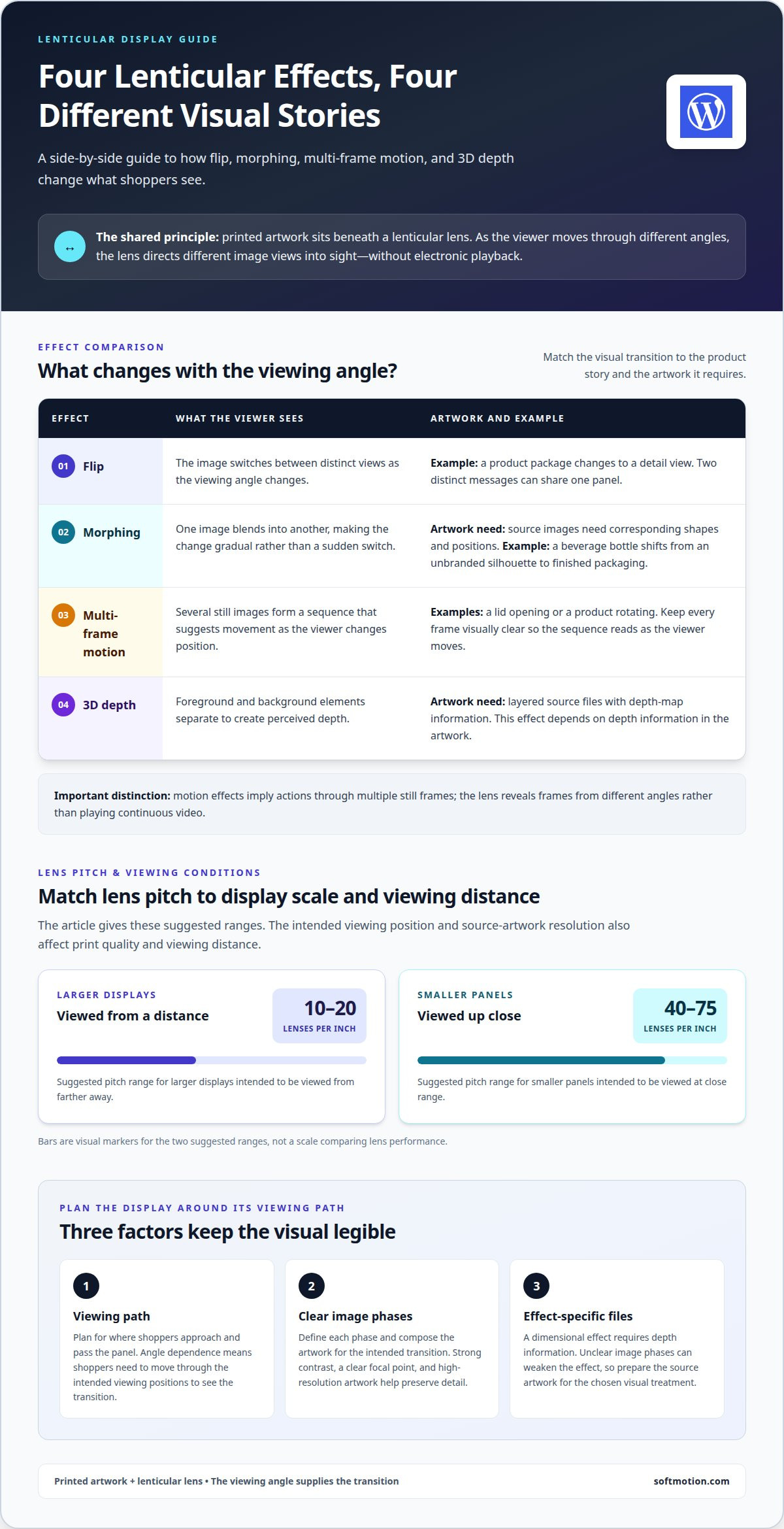
Prepare the artwork by defining each image phase, then composing the images for the intended transition. A lenticular lens separates and directs their visual elements, so strong contrast and a clear focal point help each phase remain legible. A dimensional effect requires artwork with depth information; other designs can focus on a straightforward image change.
Unlike a digital screen, a lenticular print needs no power and changes with the viewing angle rather than electronic playback. A standard printed display holds one fixed image, while a lenticular panel can reveal distinct views.
The core components are printed artwork and a lenticular lens. Materials and finishes depend on the specific display construction, so there is no single finish list that applies to every panel.
The main limitation is angle dependence: shoppers need to move through the intended viewing positions to see the transition. Artwork also requires careful preparation, since unclear image phases weaken the effect.
In the United States, custom work comes from specialist lenticular-print manufacturers. The right maker is one equipped to prepare high-resolution image phases and align them with the lens for the intended viewing path.
Flip, morph, 3D depth, and animation effects
A lenticular lens can turn still artwork into a visual sequence. Flip, morphing, zoom, 3D, and multi-frame effects each shape that sequence differently.
Flip and Multi-Frame Effects
A flip effect switches between distinct images as the viewing angle changes. For example, a product package can transition to a detail view, making two messages visible in one panel. Multi-frame effects arrange several images into a sequence that suggests movement, such as a lid opening or a product rotating. Keep every frame visually clear so the sequence reads as the viewer moves.
Morphing Effects
Morphing blends one image into another as the viewing angle changes. A beverage bottle might gradually shift from an unbranded silhouette to its finished packaging, emphasizing transformation rather than a sudden switch. The source images need corresponding shapes and positions; otherwise, the transition can feel abrupt or confusing. Choose a change that supports the product message.
Depth and Motion Effects
A 3D effect separates foreground and background elements to create perceived depth. It requires layered source files with depth-map information. Motion effects use multiple frames to imply actions such as turning or opening; the lens reveals those frames from different angles, rather than playing continuous video. Ghostarchive describes lenticular lenses as capable of producing stereoscopic images without glasses.
Print quality and viewing distance depend on source-artwork resolution, lens pitch, and the intended viewing position. For larger displays viewed from a distance, the suggested pitch is 10-20 lenses per inch; for smaller panels viewed up close, it is 40-75 lenses per inch. These ranges help match the lens to the display scale and viewing conditions.
For a showcase built around a specific visual sequence, lenticular display planning can help align the effect with the intended viewing experience.
In-store point-of-sale applications
In retail, placement and shopper movement determine how a lenticular visual supports a product or campaign. Plan the display around the moment customers encounter it.
Retail Point-of-Sale Displays
Near a shelf, checkout, or product launch area, a changing image can connect a message to the item beside it. A cosmetics display, for example, might shift from the package to a close-up of its finish. High-traffic positions suit the effect when shoppers move laterally past the panel and can see its changing views.
Installation starts with choosing a stable mounting surface and orienting the panel for the expected approach. Keep the lens face accessible for routine cleaning, and inspect the mounting for looseness during store maintenance. Clear nearby obstructions so product fixtures or promotional materials do not block the intended viewing path. When creating bespoke structural fixtures or custom display enclosures, design specialists such as Ljungdahl Engineering can assist with CAD design and modeling to turn conceptual concepts into accurate physical builds.
Advertising, Brand, and Event Uses
In advertising, a transition can connect a brand image with a product feature or campaign message. Keep the sequence focused: a clear change between package and product detail is easier to follow than unrelated visuals. One panel can also present more than one product or message.
At a trade show, a lenticular graphic can make a booth’s visual story shift as visitors walk past. Consider the aisle direction, viewing distance, and where people pause before choosing the image sequence. Displays can be reused across multiple events, extending a visual concept beyond one retail activation.
Maintenance should protect the image surface and keep the installation secure. Use a cleaning method suited to the display’s materials, and avoid placing objects against the lens face. For a seasonal retail campaign, staff can also check that the panel remains aligned with the product and visible from the main aisle.
Audience engagement with dynamic displays
A changing visual gives shoppers a reason to look again. In a cosmetics aisle, a panel might shift from a product package to a close-up texture, turning one brand message into a brief visual sequence. The effect works best when each view supports the same product story rather than competing for attention.
Curiosity is only the first step. A useful display gives that glance a clear destination: a product name, feature, or distinction shoppers can remember. For example, a home-care brand could move from the bottle to an image of the surface it is designed for. Keep the central message prominent in each view, so the visual change reinforces recognition instead of obscuring the product.
Placement shapes the interaction. A lenticular panel suits a high-traffic area where people move laterally, such as an aisle entrance or a retail display beside a promoted item. Align the image sequence with that direction of travel. If shoppers approach from the opposite side, the transition may appear in an unintended order and weaken the story.
For lenticular displays for product showcases, assess engagement by the quality of the interaction, not movement alone. Consider whether shoppers can understand the product message, notice the visual change, and connect both views to the same brand. A focused sequence can bring a package, product detail, and campaign idea together as one experience.
Use these practical checks when planning a display:
- Choose one primary product message for the sequence.
- Place the panel along a path where shoppers naturally pass from side to side.
- Keep each image legible and visually connected to the next.
- Assess whether the changing view supports the product decision at that location.
A dynamic visual can attract attention, but it works best when the message, placement, and movement agree. Plan an advertising lenticular display around the shopper’s path and the product story you want each view to carry.
Softmotion: Advertising Lenticular Displays
Softmotion creates Advertising Lenticular Displays for brands that want an in-store product story to shift with shoppers’ movement. The work brings together the visual sequence, artwork, and display format, aligning the effect with the product message and viewing environment.
Choose this offering when a static showcase feels too limited for the story you want to tell, such as revealing a product detail alongside its packaging. Start with a clear message and a considered viewing path, then shape the lenticular effect around them. For other creative applications, Softmotion also offers Architectural Lenticular Installations, Fine Art Lenticular Prints, and Tradeshow Lenticular Graphics.
Contact Softmotion to discuss an advertising display for your product showcase.
Shape the next in-store experience
Choose the product story first, then let the display format serve it. A showcase can introduce a design, spotlight a defining detail, or strengthen the visual connection between a product and its brand. With lenticular displays for product showcases, shape the image sequence around the shopper’s path and the message you want them to remember.
Softmotion offers Advertising Lenticular Displays for retail messaging, alongside Architectural Lenticular Installations and Fine Art Lenticular Prints. Each brings lenticular imagery into a space in a distinct way, from a product-focused presentation to a larger visual feature.
Share the product, setting, and visual idea you have in mind. Contact Softmotion about your display to begin shaping a considered showcase. A clear story is a strong place to start.
Frequently Asked Questions
What is a lenticular display and how does it work?
A lenticular display combines printed artwork with a lens sheet that presents different image views at different angles. The result depends on coordinating the artwork and lens alignment with the intended viewing path. In a retail setting, choose a product idea that remains recognizable across each view, such as packaging alongside a defining feature. This keeps the visual change connected to the item shoppers see nearby.
What types of lenticular effects work best for product showcases?
The best effect depends on the product story. A flip suits a clear contrast, such as a package shown in two designs. Morphing can connect related visuals through a gradual transformation, while 3D depth emphasizes the product’s form. Multi-frame effects can suggest an action or sequence. Keep the central product recognizable, and choose an effect that supports the message rather than competing with it.
What are common sizes and formats for lenticular product displays?
Large-format lenticular wall displays can start at 2 ft. x 2 ft. and extend to the size of free-standing walls. Retail formats can therefore range from a panel near a product to a larger feature that addresses shoppers across a store area. The right scale depends on where people encounter the display and how far away they view it. Match the format to the placement.
How do you design artwork for a lenticular display?
Begin by assigning a clear purpose to each image view, then prepare high-resolution artwork for every phase. Keep essential elements, such as a product silhouette or brand mark, clear across the sequence. For a 3D effect, organize the artwork into layers with depth-map information. These choices help the finished design communicate consistently as the viewing angle changes.
What materials and finishes are available for lenticular displays?
A lenticular display combines printed artwork with a lens. Wall displays can use rigid board with UV-cured ink, while materials and finishes depend on the display’s construction.